
How the GlamBug B2B App Makes Wholesale Silver Jewellery Buying Faster and Easier
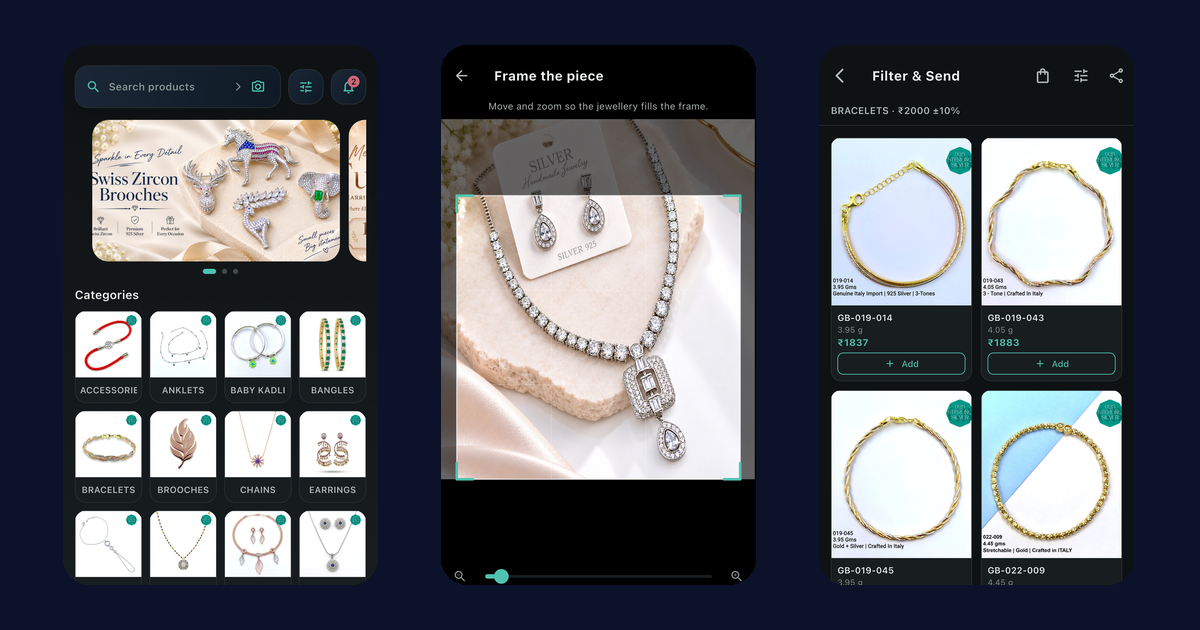
Buying wholesale silver jewellery is rarely hard because of the jewellery. It is hard because of everything around it: describing a design you saw somewhere, scrolling a long catalogue for something near a budget, retyping last month's list, and chasing a status you cannot see.
The GlamBug B2B Catalogue App is built around those frictions. This guide goes through the common ones, one at a time, and shows what the app does about each. If you have not used it yet, the step-by-step guide to the B2B app explains sign-in, approval and the first order.
The app just got a big upgrade
We have been busy. The latest version of the app is one of the biggest updates we have made: new ways to find designs, new ways to build an order, and a much clearer view of every order after you send it. You can now search the catalogue with a photo, find pieces by budget in a few taps, get ideas for what goes with your selection, reorder what sells in one go, and watch each order move step by step. The app also looks and feels smoother, with small touches like a design flying into your bag when you add it.
Update the app from the App Store or Google Play to get all of it. Here is what each new feature does for you.
"I saw a design but I do not know what to call it"
A customer shows you a piece on their phone. You noticed one at a show. A competitor has a chain you would like to stock. Describing it to a supplier by message is slow, and often ends in "send me what you have".
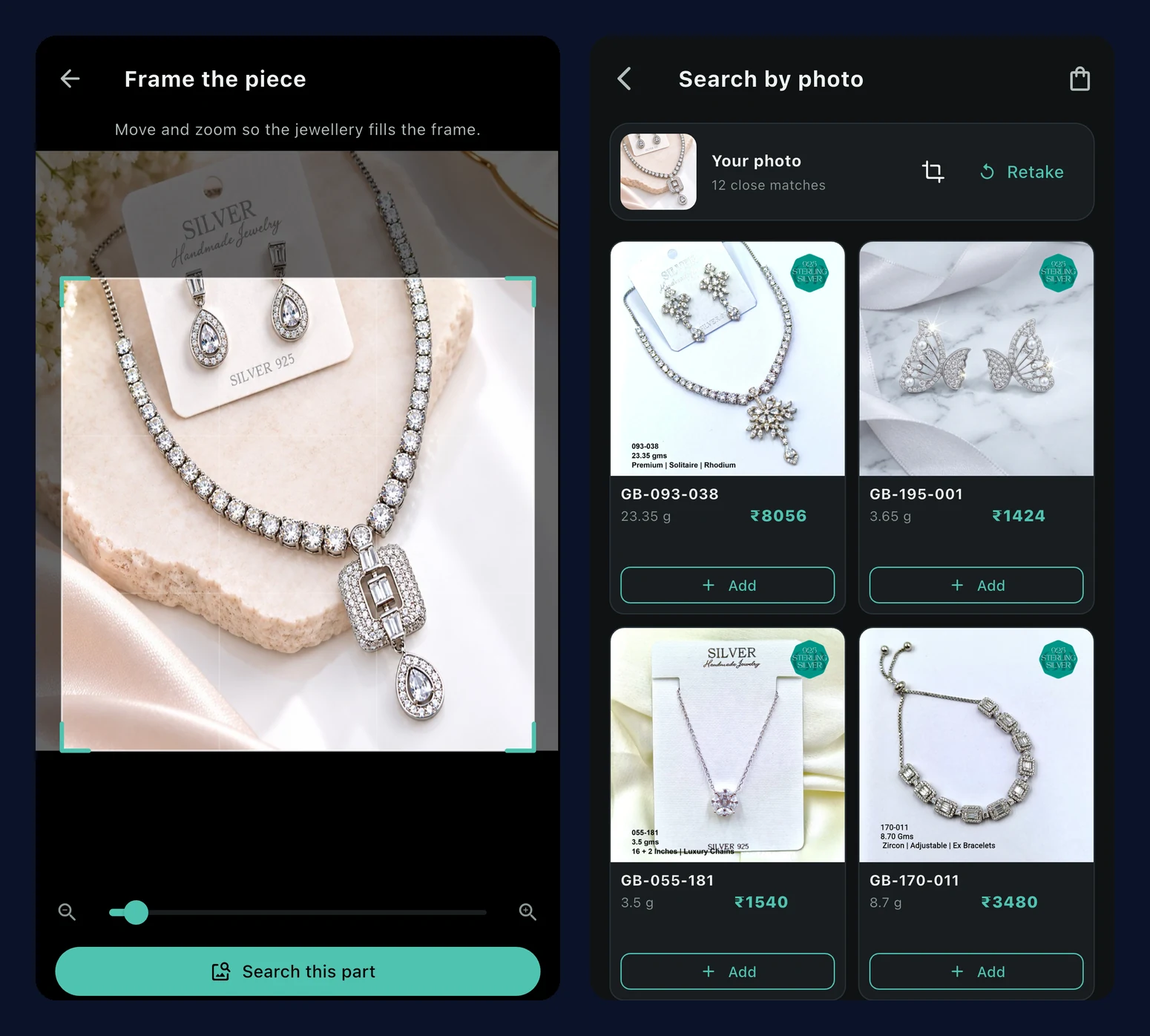
What the app does: tap the camera in the search bar on Home, take a photo or pick one from your gallery, and the app looks for similar designs in our catalogue. If the photo has a lot in it, a frame step lets you drag and zoom to the exact piece, then choose Search this part, or Use the whole photo.
Your photo is used only to find matches and is not saved, and the app allows up to 20 photo searches an hour. If nothing close is found, it says so and suggests a clearer photo on a plain background. Results are similar designs, not a promise of an identical piece, so treat them as a shortlist to look at.
"My customer has a budget, not a design"
"Show me bracelets around ₹2,000" is one of the most common requests a reseller gets. Answering it usually means opening a category, checking prices one by one and screenshotting the ones that fit.
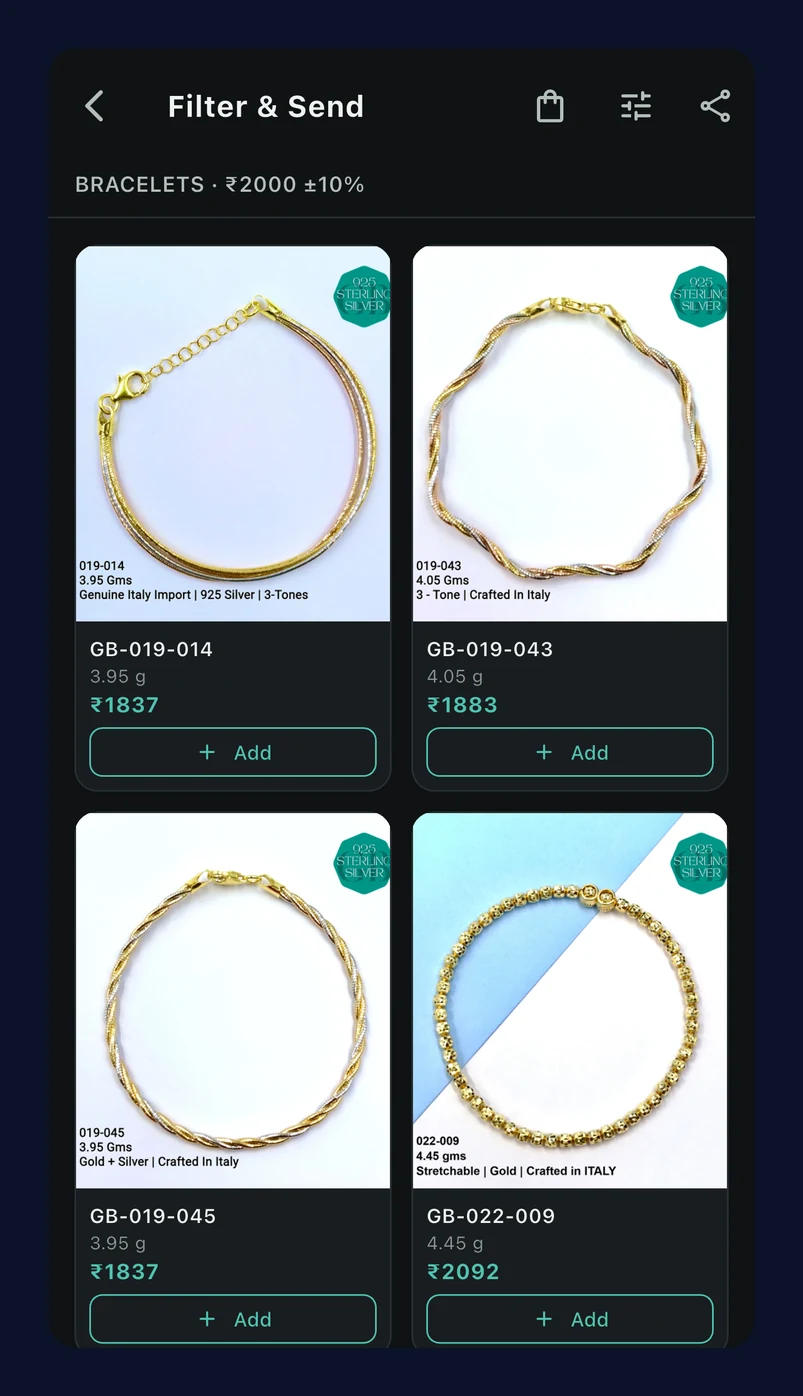
What the app does: the filter button next to the search bar on Home opens Filter & Send. Pick a category, enter a target price, and set a tolerance (it starts at ±10%). The app lists the in-stock designs inside that band, at the price for your account type, 50 to a page.
An example. A customer messages asking for bracelets around ₹2,000. You open Filter & Send, choose Bracelets, enter 2000 and leave ±10%, so the app looks between ₹1,800 and ₹2,200. The matching designs appear. Tap Share this page and that page's photos go out through your phone's share sheet, to the customer on WhatsApp for example. When they choose, add them to your order straight from the same results. What is shared is the product photos, so tell the customer the prices yourself.
"Building an order takes too many taps"
A long catalogue means scrolling, opening a product, adding it, going back, and starting again.
What the app does: each design card shows the SKU, weight and category on one line, with the price for your account. The Add button on the card becomes a quantity stepper once the design is in your Selections, so you can add and adjust without opening the product. Wholesale accounts see prices with 3% GST included, so what you see on the card is the figure to work with.
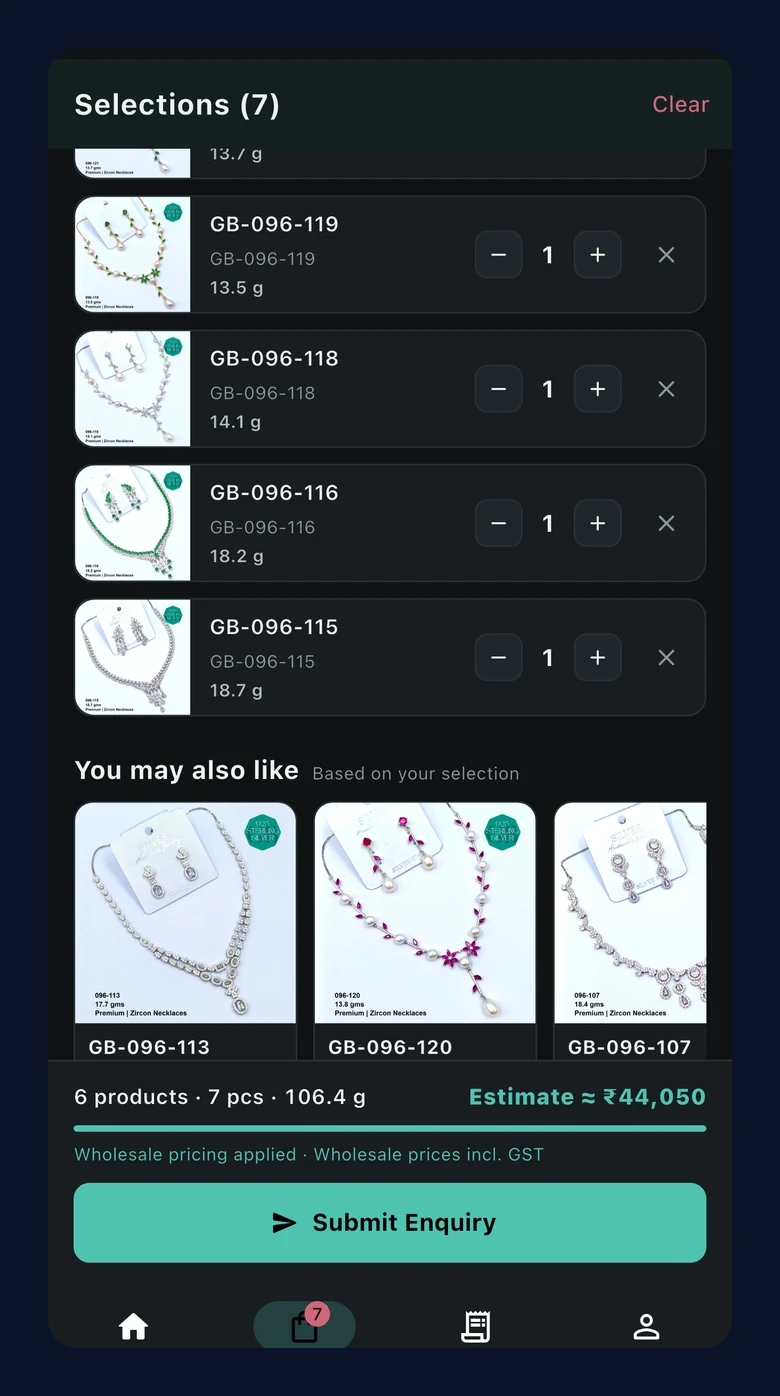
As you add, the Selections screen keeps a running summary: how many products and pieces, the total weight, and an estimate of the order value. It also tells you where you stand against the 100 g minimum. Wholesale accounts see how many grams are left to reach it, then "Minimum order reached". Resellers see how many grams are left to reach 100 g for wholesale pricing, then "Wholesale pricing applied". Nothing is a surprise when you send the enquiry.
"I am not sure what else would go with this"
Choosing a range often means looking at one design and wondering what sits well next to it, which usually sends you back to the catalogue.
What the app does: on a product page, a Similar designs row shows designs that look like the one you are viewing. Under your Selections, a You may also like row suggests designs based on what you have already chosen. Both have a quick Add on every card, so building a matching set takes a few taps. The rows load by themselves and stay out of the way when there is nothing to suggest.
"I tapped the wrong thing"
Mistakes in a list are normal, and they should not mean starting over.
What the app does: in Selections, swipe a design away to remove it. A bar appears with Undo, so a slip is fixed in one tap.
"I buy the same things every month"
Restocking what sells is most of wholesale buying, and retyping the list each time is wasted effort.
What the app does: on a dispatched order, tap Reorder. The same designs go into your Selections, on top of anything already there, using today's catalogue: current prices, weights and stock. If something is no longer available, or only fewer pieces are in stock, the app tells you in plain words, for example which SKUs are unavailable. Designs the team did not accept in the original order are left out, because you did not receive them.
"Where is my order?"
Every follow-up message or call about status is time spent away from selling.
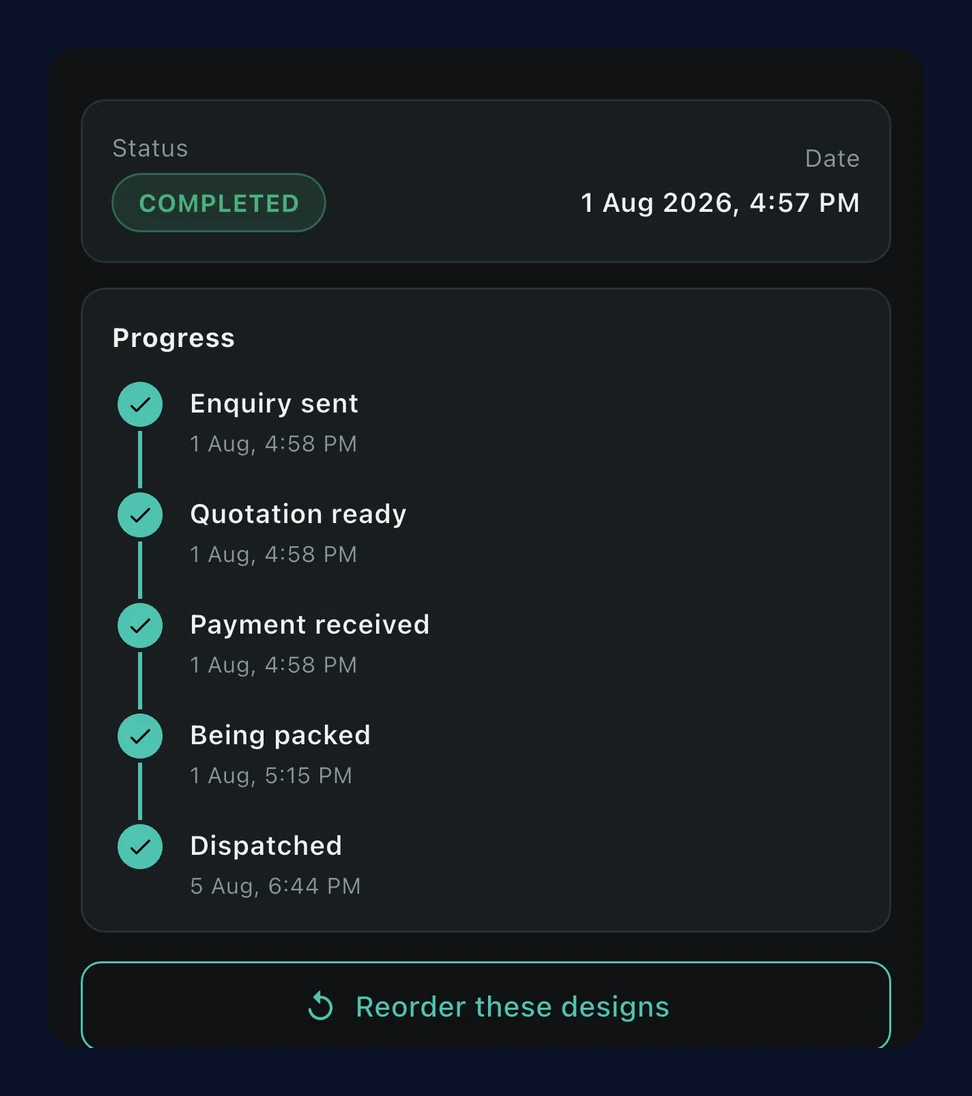
What the app does: each order shows a short progress timeline: Enquiry sent, Quotation ready, Payment received, Being packed and Dispatched. The step it is at now is highlighted, with the date and time of the steps already done. An order the team could not fulfil, or that was cancelled, ends in a clearly marked step instead.
You also get notifications as the status changes, and tapping one opens that exact order, not just a list. The notifications screen groups them by day, so yesterday's update is easy to find.
"I did not know about the delay"
A courier delay, a holiday closure or a new catalogue is exactly what a buyer wants to know before placing an order, not after.
What the app does: the team can put a short notice on your Home screen. It shows as a coloured bar (red for important, amber for a notice, green for good news), and a long message slides across so all of it can be read. It clears by itself on the date we set, so old notices do not pile up.
Who gets the most from it
- Resellers who answer customer requests all day gain the most from photo search and Filter & Send.
- Jewellers and retailers who restock regularly gain the most from Reorder and the order timeline.
- New buyers can see the full catalogue, rates for their account type and the minimum order rule on every product (100 g per order for wholesale accounts, mixed categories allowed) before they send anything.
None of this replaces talking to us. WhatsApp ordering and video call selection stay available. The app simply takes the routine parts off your plate.
Frequently asked questions
Do I need approval before I can use these features?
Yes. The GlamBug team approves each business account first, usually within minutes and up to 4 hours on business days.
Does searching by photo save my photo?
No. It is used only to find matches and is not saved.
What does Filter & Send share?
Only the product photos from that page of results. Prices are not attached.
Can I reorder an old order that is no longer in stock?
Reorder uses today's catalogue and tells you which designs are unavailable or reduced.
Is there a minimum order?
Yes: 100 g per order for wholesale accounts, mixed categories allowed.
Where do I download the app?
On the App Store or Google Play. Read more on the B2B Catalogue App page.
Get started
Update the app, or download it and sign in with your WhatsApp number. Once the team approves your account (usually within minutes, and up to 4 hours on business days), try a photo search with a design you have been trying to find, or run one Filter & Send for a customer's budget, and see how much of the usual back and forth disappears.
Read more about wholesale 925 silver jewellery, or message us on WhatsApp at +91 72079 01555, Monday to Saturday, 10am to 8pm.